The OLE server registration (= starting the application with the parameter /regserver) can now be done without valid license file. This applies to the start parameter /unregserver as well.
Running the application as OLE server does require a valid license, however …
The Zeiss Optoplex NGQ software can create *.csv files which contain all measured spectra of an exsitu traverse scan. Von Ardenne exsitu files have a similar content.
You can now easily fit the spectra of all probehead positions using the batch control window. Once you have a good fit routine, you can execute the batch control menu command “Prepare/New batch fit”, followed by the command “Prepare/New results page for Optoplex NGQ file” or “Prepare/New results page for Von Ardenne exsitu file”. Then press “Go”.
CODE will fit all spectra and write the fit results to the page “Results”. Using view objects of type “Batch control graph (rows)” you can visualize obtained thickness profiles, for example.
We detected and solved an issue saving fit parameters in configurations which contain several interband transitions. When you load such a configuration some fit parameters may point to the wrong susceptibility. If you recompute the optical model the result is a kind of garbage, in most cases.
If you are experiencing this problem you should load the configuration and delete all fit parameters before you update the optical model. It is then safe to generate new fit parameters and save the configuration using program versions generated after June 2, 2015.
The computation of depth dependent, local absorption in layer stacks is much faster now.
This improvement speeds up objects of type “Local absorption” in the list of distributions, but also objects of type “Layer absorption” and “Charge carrier generation” in the list of spectra.
In CODE the computation of the integral quantity “Photo current” benefits from the enhancement.
After drag&drop of an integral quantity into the list of view elements the newly created view item lost its source after a “Duplicate” command. This has been fixed.
The computation of U-values according to the NFRC standard did not work properly for thin glass panes – the temperature profile did not converge. This has been corrected.
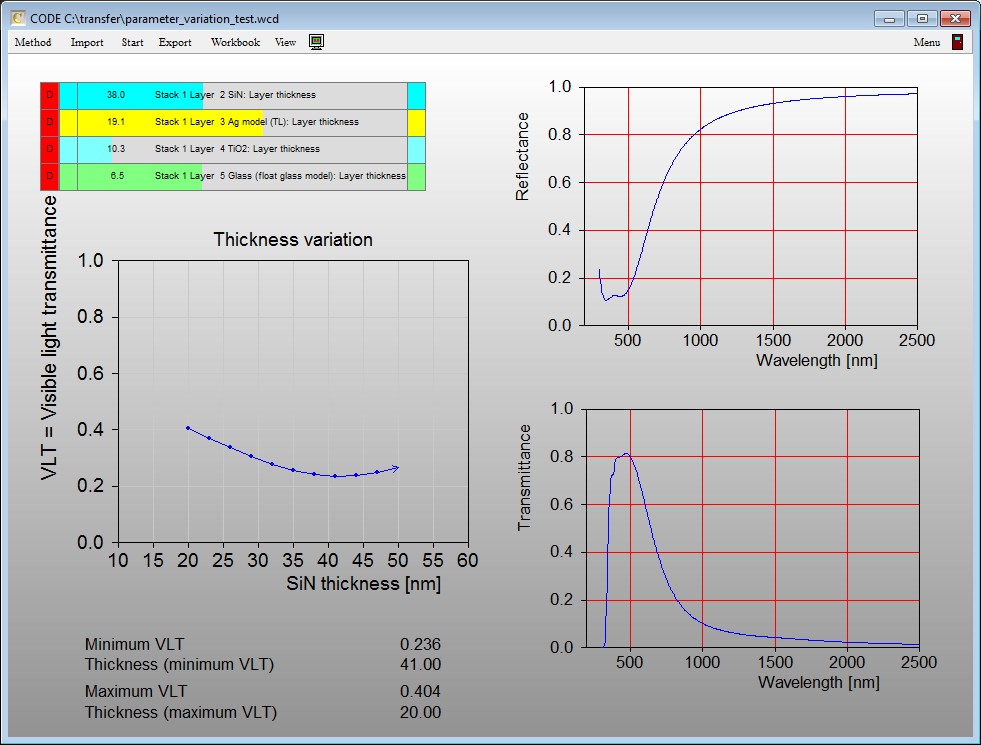
Objects of type ‘parameter variation’ in the list of special computations keep the highest and lowest y-values and the corresponding x-values. You can retrieve these values as optical functions and show them in a view.
Here is an example:
The SCOUT technical manual has been updated – it contains a documentation of parameter variation objects as members of the list of special computations. Here is a link:
Pressing the key h in the main view immediately jumps to a default home configuration. You can set this configuration using the command File/Options/Set default home configuration. The setting will be stored for each user individually.